


Connectify Hotspot 2017 MAX is the only virtual router software that gives you a real Wi-Fi Repeater so you can extend the range of your home or office Wi-Fi.
How Does a Wi-Fi Repeater Work?
A Wi-Fi repeater is just what it sounds like: a product that lets you repeat or rebroadcast your main Wi-Fi network, boosting its signal and allowing you to extend the reach of your home or office network. Wi-Fi repeaters are typically hardware devices that can cost hundreds of dollars. But, with Connectify Hotspot MAX, you can turn your laptop into a real WiFi repeater with a few clicks (and at a fraction of the cost).
Get Full Wi-Fi Coverage for Your Home or Office
To set up Connectify Hotspot MAX as a Wi-Fi repeater you must already be connected to the network you want to extend. Then simply click on the ‘Wi-Fi Repeater’ button at the top of the program interface, make sure that the Wi-Fi network you want to repeat is selected and start your Hotspot. It’s that easy! Plus, you’ll also benefit from our whole house ad blocker solution!
Hotspot will broadcast an access point with the same SSID and password as the original network. Clients that connect will be bridged directly onto the original network using Hotspot’s network bridging capabilities.
You can learn more about bridging mode here.
Extend Your Wi-Fi Without a Router in Four Easy Steps

Step 1: Click here to upgrade to Connectify Hotspot MAX
Step 2: Once installed, click the WiFi Repeater Mode button at the top of the Connectify Hotspot interface
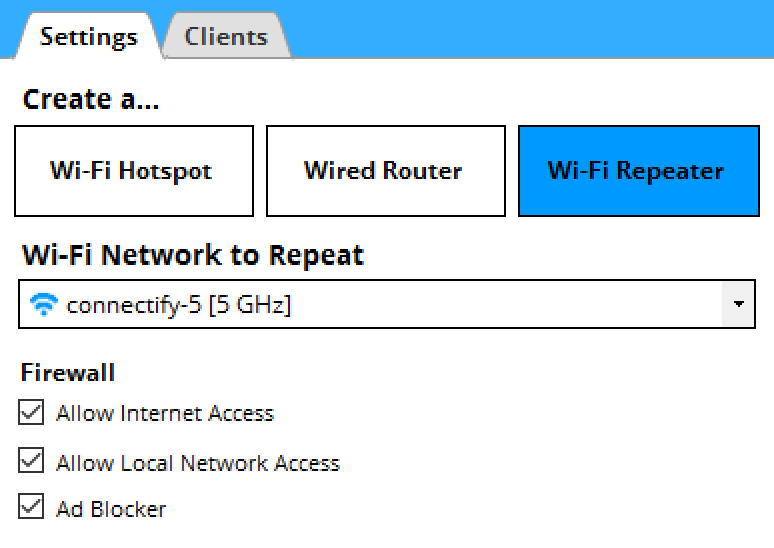

Step 3: Choose the WiFi network you want to repeat from the Wi-Fi Network to Repeat dropdown menu
Step 4: Finally, click the ‘Start Hotspot’ button and Connectify Hotspot MAX begins acting as a repeater to extend your WiFi signal instantly
Connectify Hotspot – The Only True WiFi Repeater Software
Other hotspot applications (including earlier versions of Connectify Hotspot), may have modes that try to “extend” the range of your Wi-Fi network, but they do it without bridging. This means that clients that join your hotspot don’t get real IP addresses from the shared network. They can get on the Internet through the hotspot, but they’re not really on the network to do any peer-to-peer networking. So, game consoles will report NAT problems, Chromecast apps won’t find your Chromecast, your Apple TV won’t show up for your Mac to stream to… the list goes on.
If a large, seamless home or work network is what you want, then hurry up and get Connectify Hotspot MAX.