


Connectify Hotspot – the Only True Repeater Software
A WiFi repeater is just what it sounds like: a piece of hardware or software that lets you repeat or rebroadcast your main WiFi signal with the same network name and password. Most WiFi repeaters are hardware devices with antennas that cost a bundle, and require you to carry yet another device around with you in order to stay connected.
Most repeater software free applications do this without bridging. This means that clients that join your hotspot don’t get real IP addresses from the shared network. They can get on the Internet through the hotspot, but they’re not really on the network to do any peer-to-peer networking. So, game consoles will report NAT problems, Chromecast apps won’t find your Chromecast, your Apple TV won’t show up for your Mac to stream to… the list goes on.
Read below to find out how you can use the Connectify Hotspot repeater software free app to turn your laptop into a virtual WiFi repeater and enjoy better wireless signal with no additional hardware!

Connectify Hotspot Repeater Mode
Connectify Hotspot extends your Wi-Fi using the Windows PC you already own
Connectify Hotspot's Repeater Mode rebroadcasts the network you are already on, under the same name and password. Devices at the far end of the house join the same Wi-Fi as always and hand off without asking you to pick a second network.
A dedicated extender costs money and takes an outlet. A Windows laptop or desktop that is already sitting in the right room does the same job with software, and Repeater Mode keeps the network name identical so phones roam onto the stronger signal on their own.
Placement decides whether Repeater Mode helps. Put the Windows PC where the router signal is still solid but starting to fade, roughly at the edge of good coverage, not in the room that has no signal at all.
MAX Repeater Mode is a Connectify Hotspot MAX feature. The free and PRO versions create a separate network instead of rebroadcasting the existing one.
A repeater can only rebroadcast what a repeater receives. A Windows PC parked in the dead zone will rebroadcast a weak signal, so moving the PC closer to the router does more than any setting in the software.
Available for Windows 10 and 11
Extend WiFi Range with Connectify Hotspot Repeater Software Free
Do you need to boost the range of your WiFi network, but don’t want to go through the hassle of setting up a hardware WiFi repeater or buying another wireless router? There are easy-to-use free repeater software products that let extend the range of your home or office WiFi. Products like Connectify Hotspot virtual router software allow you to create a WiFi repeater with just a few clicks… and there’s no additional hardware necessary!
Connectify Hotspot uses your laptop’s wireless card or your PC’s WiFi adapter to give your existing WiFi network the signal boost needed to reach that out-of-signal place in your home or office. Watch the tutorial video below to learn how you can turn your laptop into a WiFi repeater and boost the range of your existing wireless network at the click-of-a-button. All with Connectify Hotspot repeater software free!

Four Steps to Setup the Connectify Hotspot Repeater Software Free
Step 1: Click here to get Connectify Hotspot MAX.
Step 2: Once installed, click the WiFi Repeater Mode button at the top of the Connectify Hotspot interface
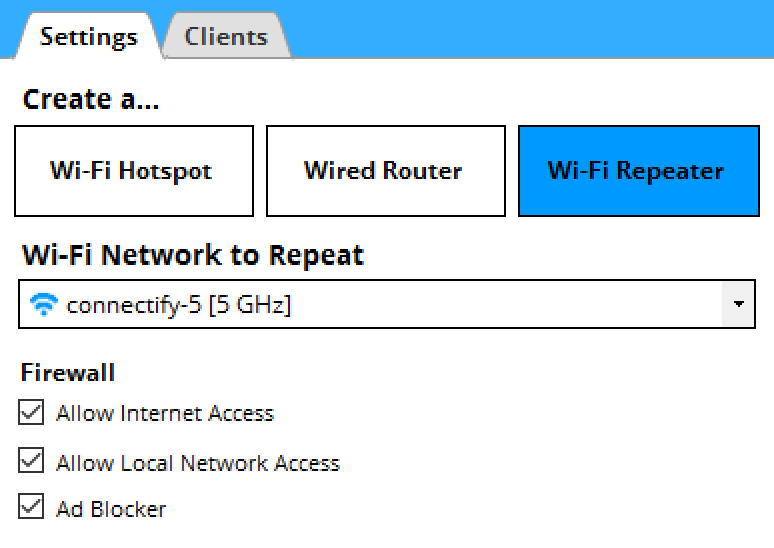

Step 3: Choose the WiFi network you want to repeat from the Wi-Fi Network to Repeat dropdown
Step 4: Finally, click the ‘Start Hotspot’ button and Connectify Hotspot will begin to act as a repeater software to extend your WiFi signal instantly
Not Just Repeater Software; Connectify Hotspot Does Much More!
Here’s what else you can do with Connectify Hotspot:
- Save up to 60% of Internet bandwidth by using the built-in universal ad blocker. It even blocks in-app ads!
- Easily bridge other devices onto your home network with WiFi Bridging Mode: eliminate all game consoles (Nintendo, Playstation, Xbox) and smart TV issues with your home WiFi network!
- Save Money While Traveling: Get all devices online for the price of one when being charged for Internet per device at hotels, on airplanes, etc.
- Share any Type of Internet Connection with All your Devices: share Internet from existing WiFi networks, LAN, DSL, 3G/4G, even tethered smartphones!
Free, PRO or MAX
Which version of Connectify Hotspot you need
This setup needs Connectify Hotspot MAX. Connectify Hotspot's Repeater Mode and Bridging Mode are both MAX features, and this guide relies on both.
Recommended: MAX is the full version, so nothing in any other guide on this site is out of reach.
Available for Windows 10 and 11