

Internet Connection Sharing Alternative to Share WiFi Over Ethernet in Windows 10
Do you have certain devices around the house or in the office that can’t connect directly to the Internet through a WiFi connection? Some older smart TVs, media players or game consoles are just a few examples of devices that need a wired Ethernet connection to the Internet.
If you’ve got your home or office wired from a router to each device’s location, then it’s simple to plug the Ethernet cable in. But, as experience shows, it’s more convenient to connect those devices to the Internet from a laptop right on the spot. So, you need a way to share WiFi over Ethernet, so that your smart TV or media device can use that connection to access the Internet.
Read below to see how easy it is to share WiFi over Ethernet in Windows 10 with Connectify Hotspot.
Wired in, Wi-Fi out
No router? Connectify Hotspot makes your Windows PC the router.
A Windows PC with a working connection already has everything a router has. Connectify Hotspot takes the connection coming in over the cable and hands out a Wi-Fi network your other devices can join.
Wired in Wi-Fi out
-
At the office
A desk with a network port and no wireless you are allowed to join. The Windows PC on that port can put your phone on the same connection.
-
In a hotel room
Older rooms still have an Ethernet socket behind the desk and little else. One cable covers everything you travelled with.
-
At home
A modem with no Wi-Fi built in. The Windows PC already plugged into that modem can hand out a network to the rest of the house.
Available for Windows 10 and 11
If the setup becomes something you use daily rather than once, Connectify Hotspot PRO drops the 60-minute session limit.
Why Share WiFi Over Ethernet in Windows 10 with Connectify Hotspot?
Connectify Hotspot is a powerful virtual router software that allows you to share WiFi over Ethernet in Windows 10, 8 and 7, but has many other capabilities you will find useful.
Connectify Hotspot can keep all your devices connected to the Internet thanks to its ability to share any type of Internet connection (3G, 4G/LTE, WiFi, Ethernet) via WiFi or Ethernet. Connectify Hotspot can share the Internet connection with your gaming consoles (Playstation, Xbox, Nintendo), streaming media devices (Chromecast, Amazon Fire TV, Roku), tablets, e-book readers (Kindle, Nook), other laptops and computers, smartphones, smart TVs, and basically any device that has WiFi or Ethernet connectivity.
Whether you’re traveling, at home, or just working from a coffee shop, Connectify Hotspot is your personal virtual router you have on your laptop that keeps you connected anytime and anywhere.
Five Steps to Share WiFi Over Ethernet in Windows 10
Forget about running wires under the carpets or near the edge of the room to connect your Ethernet-only device to Internet. Also – there’s no need to buy additional routers and configure them as bridges. All you need is a software program for Windows: Connectify Hotspot.
Connectify Hotspot can turn your computer into a wired Ethernet router. Here are 5 steps to share WiFi over Ethernet in Windows 10:
- Install Connectify Hotspot on your Windows 10 computer and purchase either Connectify Hotspot PRO or MAX here with a 70% discount!
- Run the program and click on the Wired Router button in the interface.
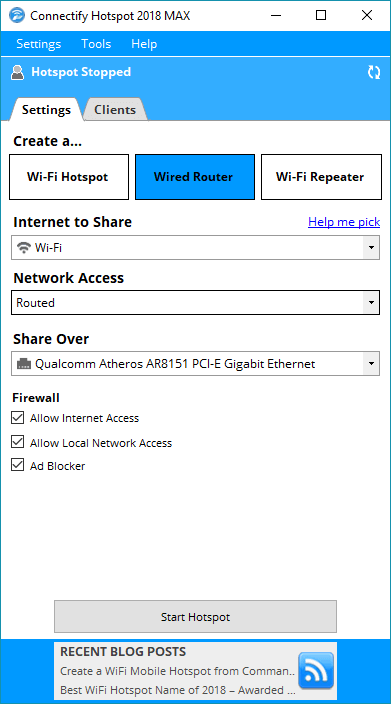
- Under ‘Internet to Share’ – select your wireless adapter – WiFi or 3G/4G.
- Under ‘Share Over’ – select your Ethernet adapter.
- Click to Start Hotspot.
Connectify Hotspot – More Than Just a Tool to Share WiFi over Ethernet in Windows 10
Along with the mobile hotspot functionality, here are other benefits for users of Connectify Hotspot:
- Boost Your Range Instantly with WiFi Repeater Mode: Easily extend the range of your existing WiFi network!
- Easily bridge other devices onto your home network with WiFi Bridging Mode: eliminate all game consoles (Nintendo, Playstation, Xbox) and smart TV issues with your home WiFi network!
- Save Money While Traveling: Get all devices online for the price of one when being charged for Internet per device at hotels, on airplanes, etc.
- Share any Type of Internet Connection with All your Devices: share Internet from existing WiFi networks, LAN, DSL, 3G/4G, even tethered smartphones!
- Solve strict NAT type issues when connecting game consoles to the Internet.
If you’re looking for an easy way to share WiFi over Ethernet in Windows 10 – get started with Connectify Hotspot! You’ll be up-and-running in minutes or less!
Free, PRO or MAX
Which version of Connectify Hotspot you need
The free version of Connectify Hotspot covers the setup in this guide. The only limit you will hit is the 60-minute session, and restarting the session takes one click.
Recommended: MAX adds Connectify Hotspot's Repeater Mode and Bridging Mode, which is what most people come back for later.
Available for Windows 10 and 11