

Connectify Hotspot: the Flexible and Affordable WiFi Ranger Alternative
Whether you’re living in a motorhome, traveling throughout the country or just need more WiFi coverage in your back yard, a WiFi Ranger device should definitely be on your shortlist.
But what if there were a WiFi Ranger alternative that is more flexible, costs much less and it’s available with the hardware devices you already own?
Find out below how you can get much more WiFi coverage where you need it and also combine multiple Internet connections for faster, more stable Internet.
Wi-Fi repeater mode
Connectify Hotspot extends your Wi-Fi using the Windows PC you already own
Connectify Hotspot's Wi-Fi repeater mode rebroadcasts the network you are already on, under the same name and password. Devices at the far end of the house join the same Wi-Fi as always and hand off without asking you to pick a second network.
A dedicated extender costs money and takes an outlet. A Windows laptop or desktop that is already sitting in the right room does the same job with software, and Wi-Fi repeater mode keeps the network name identical so phones roam onto the stronger signal on their own.
Placement decides whether Wi-Fi repeater mode helps. Put the Windows PC where the router signal is still solid but starting to fade, roughly at the edge of good coverage, not in the room that has no signal at all.
MAX Wi-Fi repeater mode is a Connectify Hotspot MAX feature. It repeats WPA or WPA2 networks and needs a Wi-Fi adapter that supports repeater mode. Hotspot Lite and PRO create a separate network instead of rebroadcasting the existing one.
A repeater can only rebroadcast what a repeater receives. A Windows PC parked in the dead zone will rebroadcast a weak signal, so moving the PC closer to the router does more than any setting in the software.
For 64-bit Windows 10 and 11
WiFi Ranger Alternative: Extend WiFi Coverage with Connectify Hotspot Software
Do you need to boost the range of your WiFi network, but don’t want to go through the hassle of setting up a hardware WiFi repeater or buying a dedicated network device, such as a WiFi Ranger? There are easy-to-use repeater software products that let extend the range of your home or office WiFi.
Products like Connectify Hotspot virtual router software allow you to create a WiFi repeater with just a few clicks… the best WiFi Ranger alternative! Wi-Fi repeater mode is part of Connectify Hotspot MAX and needs a Wi-Fi adapter that supports it. All you need is a working 64-bit Windows 10 or 11 laptop with a WiFi card or dongle. This can be the laptop you’re currently using or an older laptop or PC that’s just collecting dust.
Watch the tutorial video below to learn how you can turn your laptop into a WiFi repeater and boost the range of your existing wireless network at the click-of-a-button.
Connectify Hotspot uses your laptop’s wireless card or your PC’s WiFi adapter to give your existing WiFi network the signal boost needed to reach that out-of-signal place around your RV motorhome, mansion or office.
To Combine Multiple Internet Sources Securely, Use Connectify with Speedify Fast Bonding VPN App as a WiFi Ranger Alternative
Speedify is a next generation fast bonding VPN built for speed and reliability that uses channel bonding technology to combine multiple Internet connections. This will get you faster, more stable and secure Internet.
You can use your Windows laptop to run Connectify Hotspot virtual router software and share the Speedify bonded VPN connection to all devices around your home. See below how easy it is:
It’s time to get busy:
- Download and install Connectify Hotspot and Speedify on your 64-bit Windows 10 or 11 PC.
- Open Speedify and connect to a server (usually the closest will be best). If you have multiple Internet connections from different networks, you can combine and use them at the same time with Speedify to create a super-connection with increased bandwidth and lower lag.
- Open Connectify Hotspot and choose Wi-Fi hotspot.
- Under Internet to share, pick the Speedify VPN connection. Set a password. Turn on Block ads if you want lighter pages on every device.
- Click Start hotspot. Devices join by scanning the QR code on the Hotspot screen, or with the network name and password, like any other Wi-Fi network.
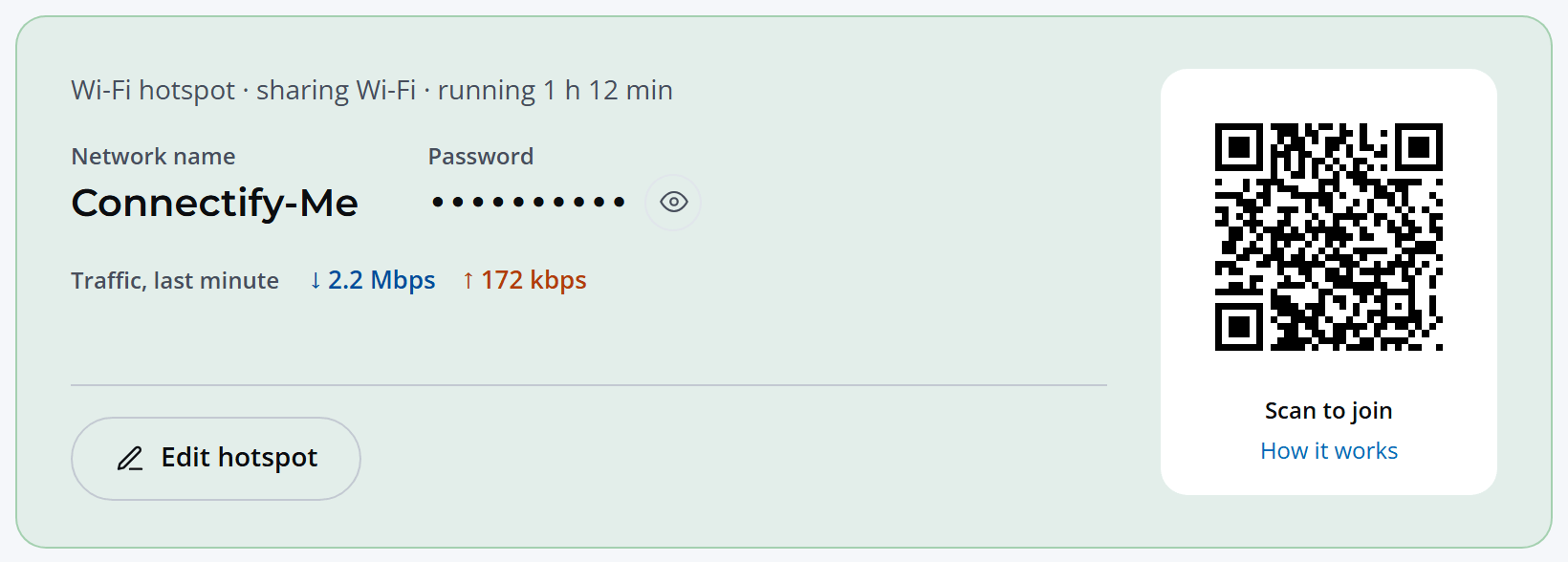
You can now connect all devices to the hotspot you configured using Connectify. All the traffic going through this WiFi hotspot will be protected by Speedify, the fast, reliable and secure VPN.
There’s your perfect WiFi Ranger alternative: it provides faster, more stable and secure Internet while being more flexible and affordable!
Additional Benefits of WiFi Ranger Alternative Solution Using Connectify Hotspot and Speedify
While other free WiFi hotspot software only “help” you share your Internet connection (inherent issues included: NAT levels, peering, Chromecast apps won’t find your Chromecast, your Apple TV won’t show up for your Mac to stream to…), Connectify Hotspot offers you more:
- Block ads for every device on the hotspot with the built-in universal ad blocker. It even blocks in-app ads!
- Easily bridge other devices, such as game consoles and smart TVs, onto your home network with bridged mode (part of MAX; works when the PC is on Wi-Fi or Ethernet).
- Travel: share one hotel or airplane Wi-Fi sign-in with your own devices while traveling.
- Share any type of Internet connection with all your devices: share Internet from existing WiFi networks, LAN, DSL, 4G and 5G modems (with PRO), even tethered smartphones!
Free, PRO or MAX
Which version of Connectify Hotspot you need
This setup needs Connectify Hotspot MAX. Wi-Fi repeater mode and Bridged mode are both MAX features, and this guide relies on them.
Recommended: MAX is the full version, so nothing in any other guide on this site is out of reach.
For 64-bit Windows 10 and 11